
Advisories
Advisory on Malware Campaigns Spreading Through WhatsApp
27 October 2026
SingCERT has received multiple reports of malware campaigns involving malicious files being distributed through compromised WhatsApp accounts. Stay vigilant and avoid opening unexpected attachments, even from known contacts.
Background
SingCERT has received multiple reports of malware campaigns involving malicious files being distributed through compromised WhatsApp accounts (as shown in Figure 1). These files may be disguised as legitimate business documents or other seemingly harmless attachments, exploiting the trust recipients place in messages received from known contacts.
In reported cases, users who downloaded and opened malicious files received through WhatsApp subsequently discovered that similar files had been sent to their contacts without their knowledge or authorisation. This could allow the malware to spread further and compromise other WhatsApp accounts.
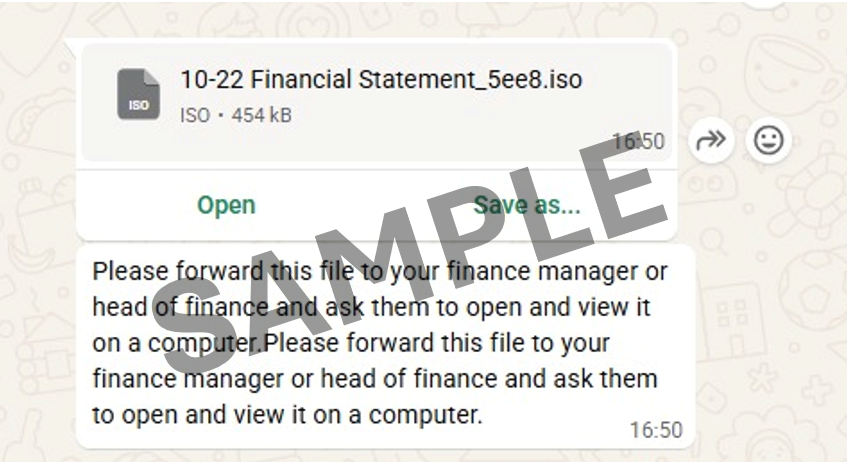
Figure 1: Sample WhatsApp Message and Malicious File
Impact
Users who run malicious files received through WhatsApp risk compromising their devices and exposing sensitive information. Depending on the type of malware involved, threat actors could:
Gain unauthorised access to affected devices;
Steal sensitive information, including account credentials;
Hijack active WhatsApp Web sessions to distribute malicious files to the affected users' contacts; and
Monitor activities on affected devices, including online banking activities.
Recommendations
Users and organisations are advised to adopt the following precautionary measures:
Exercise caution with unexpected attachments - Avoid downloading or opening unexpected files received through WhatsApp, even if they come from someone you know. Be cautious with files ending in .exe, .iso or .zip, as they may contain malware.
Verify with the sender - If you receive an unexpected file, contact the sender through an alternative trusted communication channel, such as a phone call, to check if they really sent it.
Respond promptly if you have opened the file - Disconnect the affected device from the network and scan it using antivirus software. Inform your contacts that your account may have been compromised and warn them not to open files sent from your account.
Secure WhatsApp accounts - Review linked devices in WhatsApp settings and log out of unfamiliar or unauthorised sessions. Enable two-step verification and follow WhatsApp's official account recovery procedures if your account has been compromised. Avoid accessing WhatsApp Web or other sensitive accounts from a potentially infected device until it has been secured.
Keep devices protected - Ensure operating systems and applications are updated with the latest security patches, and use reputable antivirus or endpoint protection software. More information can be found here (opens in new tab).
Report unauthorised transactions - If you notice any unauthorised banking transactions, report them to your bank and the Police immediately.
References